
How it works, in plain terms
MCP (Model Context Protocol) is a shared standard that lets AI agents ask tools questions and get structured answers back. Think of it as a common adapter: any agent that speaks MCP can plug into any tool that speaks MCP, without a custom integration for each pair.
Mallory uses it two ways.
- Your agent can ask Mallory. If your team works in Claude Code, Cursor, or another MCP client, that agent can look up a CVE, a threat actor, or an IOC in Mallory mid-task, the same way it reads a file in your repo.
- The Mallory Agent can read information from your tool. When the Mallory Agent investigates something, it can check your SIEM, your EDR, or your ticket queue for context, use that information to investigate and create a prioritized finding, then send that to your team's primary workflow console.
And the AI doing the thinking is yours. With Bring Your Own Key, the Mallory Agent runs on your OpenAI, Anthropic, Google, OpenRouter, or Amazon Bedrock account, under the agreement you already have.
Your agent, Mallory's intelligence
Mallory runs a remote MCP server. There's nothing to install: point your client at the endpoint, add your API key, and your agent gets read access to the Mallory Intelligence Graph.
That includes vulnerabilities with CVSS, EPSS, and CISA KEV status, threat actors, malware, exploits, attack patterns mapped to MITRE ATT&CK, breaches, advisories, affected products, software packages, and observables. Your agent can run semantic search across the knowledge base, check which products a CVE affects, and extract IOCs from a reference.
Every user connects with their own Mallory API key. In app.mallory.ai, open your account menu, choose API Keys, and select Create key. This is separate from the model provider key used for BYOK.
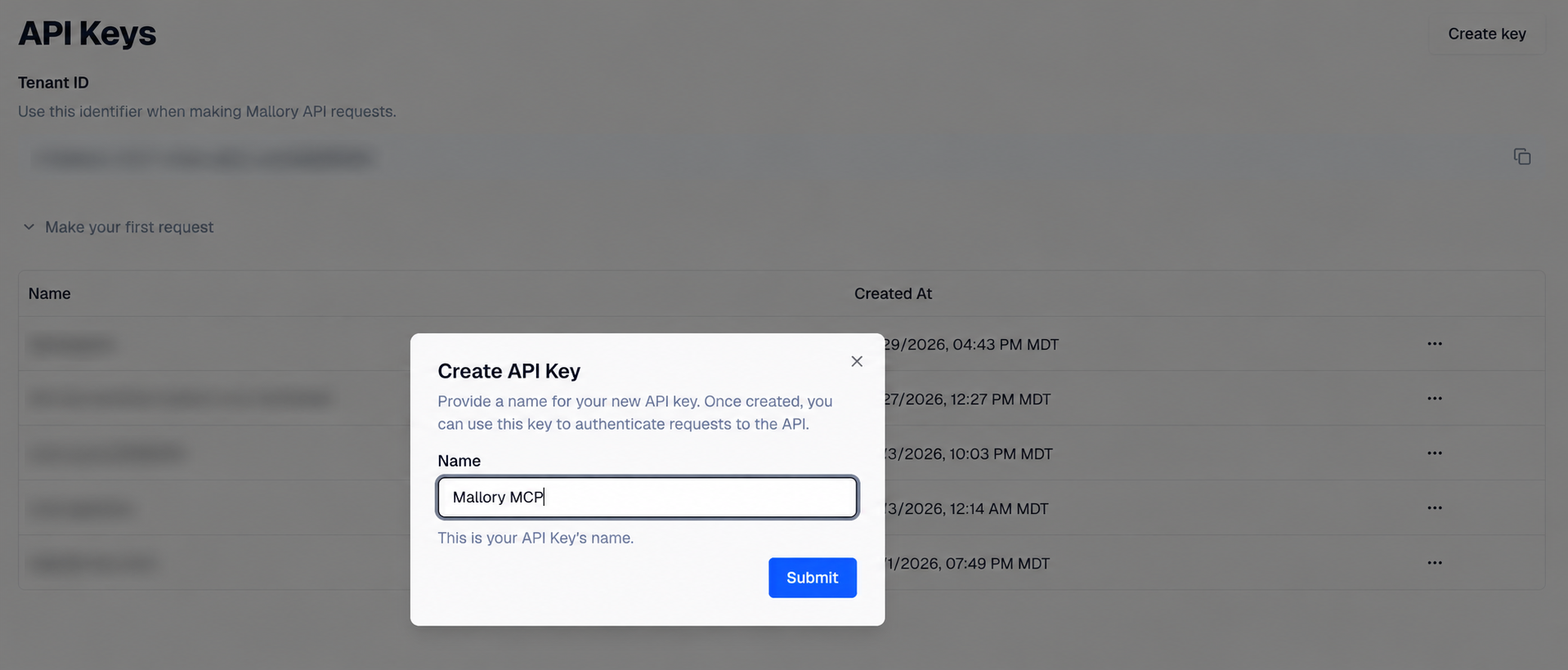
Works with Claude Code, Cursor, and Claude Desktop, plus any MCP client that supports remote HTTP servers. Claude Code users can also install the Mallory plugin, which adds skills for API queries, adversary emulation planning, and vulnerability escalation analysis.
Intelligence tools are read-only. Findings tools can also create, edit, close, bulk-update, and link tickets to your tenant's findings, subject to your plan. Those writes take effect when called; configure your MCP client to require approval for write tools.
Mallory's agent, your stack
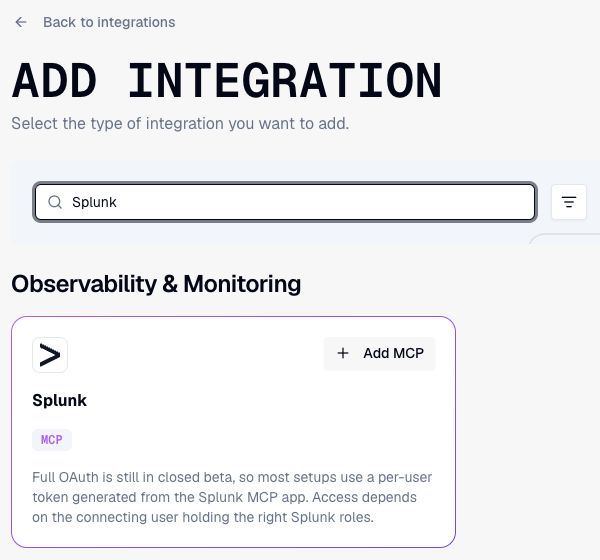
The Mallory Agent connects to the MCP servers your tools already expose. During an investigation it reads what it needs from them, correlates it against Mallory intelligence, and delivers the result where your team works.
- SIEM and observability: Splunk, Datadog, Grafana Cloud, RunReveal, Sentry
- EDR: CrowdStrike Falcon
- Ticketing and project management: Jira, ServiceNow, Linear, Asana
- SOAR and incident response: PagerDuty, Tines, Torq
- Code and knowledge: GitHub, GitLab, Bitbucket, Confluence, Notion, Slack
- Anything else: connect any MCP server by URL with your own credentials
The agent's access depends on each connector's credentials, granted scopes, and enabled tools. Read-write connections can change the systems they connect to, including creating tickets. Use read-only credentials and tool settings when you want an investigation limited to reading. The agent can also deliver findings to Slack, Teams, or email.
On the models you've already approved
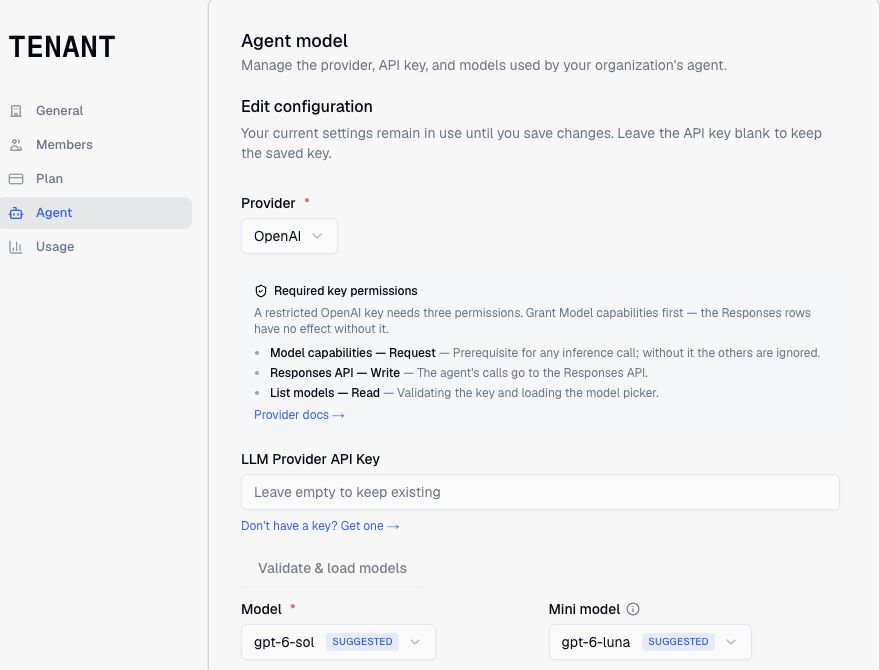
AI vendor review is slow for good reason. Bring Your Own Key means Mallory doesn't add another model provider to that review. You add your API key, and every piece of Mallory Agent reasoning runs through your account: chat in the app, Slack, and Teams, scheduled reports, tabletop scenario generation, and the reasoning behind its MCP tool calls. The tool requests themselves use each connector's credentials.
Your provider processes those prompts under your existing agreement and bills you directly, at your rate. Background processing of Mallory's public threat intelligence corpus stays on Mallory-managed inference.
Supported today: OpenAI, Anthropic, Google Gemini, OpenRouter, and Amazon Bedrock. An organization admin can set this up under Tenant settings → Agent.
The MCP server works the same way from the other side. When your own agent queries Mallory, it reasons on whatever model that agent already runs. Mallory returns intelligence; the thinking stays with you.
What it looks like in practice
Consider this workflow: a CVE in an internet-facing appliance lands on the CISA KEV list overnight. In Slack, an analyst asks the Mallory Agent whether the team is exposed.
The agent pulls the CVE from Mallory: KEV status, EPSS score, known exploits, and the threat actors tied to exploitation. It checks the available AWS asset inventory through its native integration, and searches Splunk for activity against those assets over MCP. It replies in the thread with the evidence, the actor context, and any gaps that need verification, running on the team's own Anthropic key.
Down the hall, a detection engineer has the same CVE open in Cursor. Their agent calls Mallory's MCP server for the attack patterns and observables tied to the actor, and drafts a detection rule in the repo without leaving the editor.
Both of them are working from the same Mallory intelligence, and neither had to copy anything between tabs.
Why teams turn it on
For a practitioner, it removes the tab switch. Intelligence shows up inside the investigation or the editor, and context from your own tools shows up inside Mallory's answers.
For the security program, it fits the governance you already have. There's no new model vendor to review, inference cost lands on the account you already manage with BYOK, and each connection uses the access you configure for it.
For the stack, it's additive. Mallory feeds the SIEM, EDR, and ticketing tools you run today, and nothing gets replaced to make it work.
Technical details
| Item | Detail |
|---|---|
| Endpoint | https://app.mallory.ai/api/mcp |
| Auth | Streamable HTTP with Authorization: Bearer MALLORY_API_KEY |
| API keys | Create a per-user key in app.mallory.ai → account menu → API Keys. |
| Tools | Intelligence lookups, search, and tenant findings. See the MCP docs for the latest tools and client setup. |
Get started
- 1Start a free trial, open your account menu in app.mallory.ai, and choose API Keys → Create key.
- 2Add the Mallory MCP server to your client. Setup for Claude Code, Cursor, and Claude Desktop takes a few lines.
- 3Connect your tools under Integrations and review their credentials, scopes, and enabled tools.
- 4To use your own model provider, have an organization admin add its key under Tenant settings → Agent, validate it, and choose the primary and mini models.